Need ideas of where to read up on the latest medical education research? Have a brilliant manuscript describing your curricular innovations but not sure where to publish? Need to find multimedia resources for medical education? Looking for curricular objectives to help guide your medical education project?
Look no further than the Medical Education Subject Guide available on the UCSF Library's website. The direct URL to this guide is at http://guides.library.ucsf.edu/meded.
OR you can navigate from the Library's website from the Classes, Consulting, & Help dropdown menu by selecting the Subject Guides listing. The Medical Education guide is listed alphabetically on the complete guides page.
(1) Browse the yellow tabs to explore the Library's resources available to assist in your medical education research needs.
(2) Read the latest published medical education research by UCSF medical educators.
(3) Download PDF tipsheets summarizing literature searching tips for how to search PubMed and other key databases geared to medical education.
(4) Contact me via chat, email, or phone from the right margin of the guide.
Please feel free to send me any suggestions you have for content you'd like to see on this subject guide. Bookmark this site today! http://guides.library.ucsf.edu/meded
Showing posts with label tips. Show all posts
Showing posts with label tips. Show all posts
Wednesday, July 6, 2011


Wednesday, May 18, 2011
Tips for Teaching Millennials
If you are reading this blog post, chances are you are (a) teaching millennials (b) a parent of a millennial (c) a millennial. Whichever category you fall into, as an educator, we all want our students to look as eager as this child does in class.

Below are tips condensed from their original sources. Visit the links to the original sources to see the very helpful full details related to each tip listed below.
"7 Techniques for Teaching Generation Y Students"
(see full article at http://tinyurl.com/3srwrpx)
Characteristic #1: They are technosavvy.
Recommendation: Don't talk down to them...In other words, you are a guide, a coach; you are not the Computer God in the classroom anymore.
Characteristic #2: They have short attention spans.
Recommendation: Keep it short and sweet... Use relevant examples or you will lose them.
Characteristic #3: They filter data out quickly.
Recommendation: Make your topic introductions sizzle...Introduce your topics so compellingly that your GenY students cannot help but be interested.
Characteristic #4: They multitask very well.
Recommendation: Don't get offended at other activities... Doesn't necessarily mean that you've lost their attention.
Characteristic #5: They consume information quickly.
Recommendation: Keep up the pace... As long as you are presenting the material clearly, you can almost never go too quickly for your GenY students.
Characteristic #6: Information must apply directly to them or you will lose them.
Recommendation: Customize the presentation directly to students' needs...Ask students, "What is it that you are hoping to learn today?"
Characteristic (Challenge)#7: Teaching Generation Y and Mixed Groups
Recommendation: Use body language and other clues to balance mixed groups...Simply ask the group, "How is this pace for you?" Or, "Would you like to practice this concept?"
"Generation Y - The Millennial Generation"

Below are tips condensed from their original sources. Visit the links to the original sources to see the very helpful full details related to each tip listed below.
"7 Techniques for Teaching Generation Y Students"
(see full article at http://tinyurl.com/3srwrpx)
Characteristic #1: They are technosavvy.
Recommendation: Don't talk down to them...In other words, you are a guide, a coach; you are not the Computer God in the classroom anymore.
Characteristic #2: They have short attention spans.
Recommendation: Keep it short and sweet... Use relevant examples or you will lose them.
Characteristic #3: They filter data out quickly.
Recommendation: Make your topic introductions sizzle...Introduce your topics so compellingly that your GenY students cannot help but be interested.
Characteristic #4: They multitask very well.
Recommendation: Don't get offended at other activities... Doesn't necessarily mean that you've lost their attention.
Characteristic #5: They consume information quickly.
Recommendation: Keep up the pace... As long as you are presenting the material clearly, you can almost never go too quickly for your GenY students.
Characteristic #6: Information must apply directly to them or you will lose them.
Recommendation: Customize the presentation directly to students' needs...Ask students, "What is it that you are hoping to learn today?"
Characteristic (Challenge)#7: Teaching Generation Y and Mixed Groups
Recommendation: Use body language and other clues to balance mixed groups...Simply ask the group, "How is this pace for you?" Or, "Would you like to practice this concept?"
"Generation Y - The Millennial Generation"
from Generational Learning Styles by Julie Coates. Published by LERN Books, a division of Learning Resources Network (LERN), 2007.
(see full details at http://tinyurl.com/dkbmwt)
(see full details at http://tinyurl.com/dkbmwt)
- Develop opportunities for experiential learning.
- Encourage the development of learning communities.
- Provide lots of structure.
- Provide lots of feedback.
- Use technology.
- Make it fun.
- Incorporate games.
- Be relevant.
- Utilize their talents.
- Present the big picture.
- Allow for creativity and be creative.
- Offer multiple options for performance.
- Be visual. This group is the most visual of all learning cohorts.
- Be organized.
- Be smart.
- Be fair.
- Recognize the need for social interaction.
- Remember, talk is essential.
- Structure a learning environment that demands respect and positive reinforcement.
- Tie learning to actions.
- Think positively.
- Be clear and precise.
- Allow focus time.
- Talk is critical.
- Enhance procedural memory with movement.
- Make learning relevant.
Friday, December 10, 2010
Google's Tech Quick Tip Videos
I don't know if you're like me, but if anyone in your family thinks that you have some level of tech savvy, you end up being the go-to person for tech troubleshooting for all things large and small.
For example, 20% of the time when my dad comes over to visit and is checking his email on my computer, he'll exclaim, "What happened to my bookmarks?!" Then I'll take a deep breath and remind him that his bookmarks are on HIS computer at home, and the ones on mine are specific to my computer alone.
Well, help is on the horizon now that the young techies at Google have created a fun and useful series of videos at TeachParentsTech.org. The website's name pretty much says it all.
These incredibly short and to the point videos all run under one minute. One of my favorite features is at the end of every video there is a childhood photo of the presenter with their parents.
For example, 20% of the time when my dad comes over to visit and is checking his email on my computer, he'll exclaim, "What happened to my bookmarks?!" Then I'll take a deep breath and remind him that his bookmarks are on HIS computer at home, and the ones on mine are specific to my computer alone.
Well, help is on the horizon now that the young techies at Google have created a fun and useful series of videos at TeachParentsTech.org. The website's name pretty much says it all.
These incredibly short and to the point videos all run under one minute. One of my favorite features is at the end of every video there is a childhood photo of the presenter with their parents.

Tips range from very basic (ie, how to copy and paste, or how to increase text size) to skills that everyone, not just parents, can appreciate (ie, how to take a screenshot (see below)). A lot of the tips are geared towards Mac users, but some do cover tips for PCs.
Feel free to navigate the TeachParentsTech.org website for more videos, or simply browse the related videos in the YouTube right menu after viewing one of their videos.
Share this news with your parents and other frequent tech-frantic but loving family member or friends. They'll thank you for it, and you can thank the folks at Google for making our lives easier.
Wednesday, November 24, 2010
25 Basic Styles of Blogging
Are you an active blogger? A newbie blogger? Only in the consideration stage of becoming a blogger? If you are any of these, this presentation gives some very helpful tips on the multiple types of blogging styles that can engage your readers.
Each style is rated by:
(1) Suggested frequency of postings
(2) The "Buzz Index" - how likely the posting will be linked to and commented on
(3) Difficulty level in creating each posting style
My personal opinion is that you should use any combination of several styles to make your blog interesting and engaging with your audience. No one style is dominantly the best. The ratings will help you determine which styles you should consider using most.
Each style is rated by:
(1) Suggested frequency of postings
(2) The "Buzz Index" - how likely the posting will be linked to and commented on
(3) Difficulty level in creating each posting style
My personal opinion is that you should use any combination of several styles to make your blog interesting and engaging with your audience. No one style is dominantly the best. The ratings will help you determine which styles you should consider using most.
The 25 Basic Styles of Blogging ... And When To Use Each One
View more presentations from Rohit Bhargava.
The presentation author, Rohit Bhargava, is Senior Vice President of 360 Digital Influence Group at Ogilvy, a large global advertising company.
May these tips help guide you through your blogging adventures!
Friday, January 29, 2010
Medical Education, Baby, and Me
My son was born at the UCSF Children's Hospital in early January, three weeks before his expected due date, and just one day shy of being considered full-term. Being in a high-risk pregnancy category, I knew that I wanted to have the most experienced members of the medical team at the delivery.

Santiago already contemplating life at the tender age of two weeks
I anticipated that I would probably know several of the interns and students that would be rounding while I was a patient, since I teach many literature searching workshops for the UCSF School of Medicine. My conundrum was whether or not I would feel comfortable having medical students and interns I knew professionally taking care of me in a very private and personal realm. It was tough to decide to want to keep my professional and personal life separate.
When I was admitted, I made a request to the senior attending to have only the attending or R3 (third-year resident) be the one to deliver my baby. In the end, I am very fortunate that the entire labor and delivery teams that oversaw my 32 hours of labor provided incredible expertise and support.
The delivery team consisted of the senior attending, R3, R1 (intern), medical student, labor nurse, and anesthesiologist. I was impressed by the incredible level of patience, knowledge, skill, professionalism, and caring that each member contributed to the team. This mixture of strengths ultimately reinforced my realization that when it came time to actually deliver the baby, it was more important to me to have a strong team with me, regardless of whether or not I knew any of them professionally.
In a way, I learned my lesson to practice what I preach. I have helped several faculty, clinicians and students over the years with finding resources to support the educational model of interdisciplinary education and communication skills within team dynamics. It took having to actually go through a personal experience to truly appreciate the power of this aspect of medical education. I have huge respect for the triumphs of medical education. And so very grateful to have a healthy and happy baby.
Tuesday, October 27, 2009
Download the Clinician's Toolbar to Your Browser
Kudos to you if you've already downloaded the UCSF Library's Clinician's Toolbar to your desktop browser. If you've used our toolbars in the past, you may not know that there is a new and improved version of our toolbars.
Apologies for this mouse-sized image of the Clinician's Toolbar, but I wanted to point out what the advantages are of downloading this toolbar to your browser.

(1) Get quick access to the Library by clicking on the blue UCSF Library logo on the far left of the toolbar
(2) Go straight to frequently used resources, such as UpToDate
(3) Gain additional one-click access to our online journals, find articles, or get to Drug Info and Clinical Resources on the Library's web
If you click on the dropdown arrow on the left inside the toolbar's search box, you can choose to search PubMed and Google Scholar and even Google Images as some key resources available.
If you've got the old version of the Library's toolbar on your browser, uninstall that before installing the new version.
To download and find out more about the Clinician's Toolbar, go to http://www.library.ucsf.edu/services/browsertools and scroll down the page to see more info.
Friday, November 21, 2008
Wikipedia: Love It or Leave It?
Wikipedia - honestly, who can say they have NEVER searched it before? The convenience and relative ease of finding information from Wikipedia is too tempting to bypass. Plus, Google floats Wikipedia pages pretty high up on a list of results.
For example, if you search myasthenia gravis in Google, Wikipedia is the FIRST result to appear. This entry beats out results from the National Institute of Neurological Disorders and Stroke and from the Mayo Clinic! What is at the top of a Google results list is the most linked to page on the search topic, not necessarily the most accurate or relevant page.
Over the past two years, I've noticed that some medical students cite Wikipedia as their source in writing up a short assignment. As an education librarian, this makes me twinge just the slightest bit and sigh. I teach students that Wikipedia can be a good place to start to get an overview of information, but it's NOT a resource you should cite. This is especially true if you are researching a health topic. But again, convenience wins out and some students cite Wikipedia anyway.
Wikipedia is a bit like the game of telephone that we played as children. The first person whispers the sentence to the person next to them, and as we all know, by the time the last person has received the information, it has morphed itself. That's the thing with Wikipedia and health information - most of it is quite good, but to cite it as your main resource could be risky. If by chance the information you gathered is inaccurate, you run a risk of doing harm with this information if you choose to make a medical decision for a patient based on what you find in Wikipedia.
So how then to make Wikipedia useful for finding more reliable information?
Thankfully, a well built Wikipedia entry has bread crumbs to lead you down the path to better sources of information.
(1) Look for the References link in the Contents box to see what resources were cited
(2) If a piece of information sounds interesting, look for a reference citation number (and click on it) at the end of that sentence.
(3) If it's a well-researched topic, you will see research articles listed. Clicking on the PMID or PMC link at the end of an article title will get you to the abstract in PubMed.
(4) Under the External links at the bottom, there may also be useful associations and other websites
Want to know how often a page has been edited?
Click on the history tab at the top of the page. You can see how busy people have been editing this information. Frequent editing should be a red flag of how much you can trust the information to be accurate.
Reuter's published an interesting article this month entitled Wikipedia often omits important drug information.
What's my final say on Wikipedia?
- If you find yourself on a Wikipedia result, it can be a lauching pad for finding better resources to link to and to cite those reliable resources instead of Wikipedia.
- It's a good place to get a gist of a topic.
I'm glad to see in the presentation below that a doctoral student in Communications at the University of Buffalo (SUNY) expressed his views on Wikipedia and how it can be used in education:
For example, if you search myasthenia gravis in Google, Wikipedia is the FIRST result to appear. This entry beats out results from the National Institute of Neurological Disorders and Stroke and from the Mayo Clinic! What is at the top of a Google results list is the most linked to page on the search topic, not necessarily the most accurate or relevant page.
Over the past two years, I've noticed that some medical students cite Wikipedia as their source in writing up a short assignment. As an education librarian, this makes me twinge just the slightest bit and sigh. I teach students that Wikipedia can be a good place to start to get an overview of information, but it's NOT a resource you should cite. This is especially true if you are researching a health topic. But again, convenience wins out and some students cite Wikipedia anyway.
Wikipedia is a bit like the game of telephone that we played as children. The first person whispers the sentence to the person next to them, and as we all know, by the time the last person has received the information, it has morphed itself. That's the thing with Wikipedia and health information - most of it is quite good, but to cite it as your main resource could be risky. If by chance the information you gathered is inaccurate, you run a risk of doing harm with this information if you choose to make a medical decision for a patient based on what you find in Wikipedia.
So how then to make Wikipedia useful for finding more reliable information?
Thankfully, a well built Wikipedia entry has bread crumbs to lead you down the path to better sources of information.
(1) Look for the References link in the Contents box to see what resources were cited
(2) If a piece of information sounds interesting, look for a reference citation number (and click on it) at the end of that sentence.
(3) If it's a well-researched topic, you will see research articles listed. Clicking on the PMID or PMC link at the end of an article title will get you to the abstract in PubMed.
(4) Under the External links at the bottom, there may also be useful associations and other websites
Want to know how often a page has been edited?
Click on the history tab at the top of the page. You can see how busy people have been editing this information. Frequent editing should be a red flag of how much you can trust the information to be accurate.
Reuter's published an interesting article this month entitled Wikipedia often omits important drug information.
What's my final say on Wikipedia?
- If you find yourself on a Wikipedia result, it can be a lauching pad for finding better resources to link to and to cite those reliable resources instead of Wikipedia.
- It's a good place to get a gist of a topic.
I'm glad to see in the presentation below that a doctoral student in Communications at the University of Buffalo (SUNY) expressed his views on Wikipedia and how it can be used in education:
Friday, October 31, 2008
My First Venture into Video
I recently attended the Internet Librarian Conference in Monterey, CA. It was an energetic gathering of tech savvy librarians from across America sharing their knowledge and enthusiasm of what they've created for new ways to deliver and find information online.
I attended several sessions covering how to make video podcasts. The idea of making things really come to life with video sounds just plain fun! So I put myself to work and play.
I found a free video editing program online called Jumpcut by Yahoo. It's a great first tool for me to try out because all I had to do was to upload videos and images onto the web. I could easily edit the video and add audio and text. The file is automatically compressed to the right size without me having to know anything about how to do that.
So here are the results of my first Jumpcut videos:
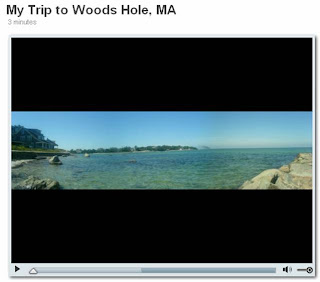
The video of Woods Hole, MA is taken from my camera phone, thus the indie "live action" bumpiness of walking and talking. The video is about twice as large as the original video display, so the film is slightly grainy, but you get a feel of what Jumpcut can do with video from a cell phone.
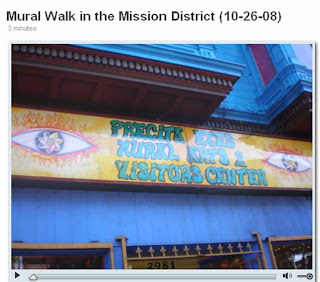
The Mission mural walk video was made from my digital camera photos.
If you're thinking of making videos to host on the web and want to start practicing, I'd highly recommend Jumpcut as a fast and easy tool to try. Have fun!
I attended several sessions covering how to make video podcasts. The idea of making things really come to life with video sounds just plain fun! So I put myself to work and play.
I found a free video editing program online called Jumpcut by Yahoo. It's a great first tool for me to try out because all I had to do was to upload videos and images onto the web. I could easily edit the video and add audio and text. The file is automatically compressed to the right size without me having to know anything about how to do that.
So here are the results of my first Jumpcut videos:
The video of Woods Hole, MA is taken from my camera phone, thus the indie "live action" bumpiness of walking and talking. The video is about twice as large as the original video display, so the film is slightly grainy, but you get a feel of what Jumpcut can do with video from a cell phone.
The Mission mural walk video was made from my digital camera photos.
If you're thinking of making videos to host on the web and want to start practicing, I'd highly recommend Jumpcut as a fast and easy tool to try. Have fun!
Re-Thinking Presentation Design (ppt)
Time to update your presentation style? Everyone can dazzle with a fresh coat of paint in a new color.
This powerpoint presentation by Oliver Adria, an electrical engineering student in Cologne, Germany, is a testament to how revamping your presentation style can make your topic more memorable to your audience.
For other presentation tips, see my blog post in June.
This powerpoint presentation by Oliver Adria, an electrical engineering student in Cologne, Germany, is a testament to how revamping your presentation style can make your topic more memorable to your audience.
For other presentation tips, see my blog post in June.
CDC Statistics and Slide Sets
The CDC website has a fantastic collection of statistical data. There is a goldmine of information, but it takes some exploring to unearth these hidden gems.
Here are different ways of getting to stats from the CDC homepage:
(1) Browse the topics under the Data & Statistics section on the right side of the CDC homepage.
(2) Under the Diseases & Conditions section, a statistics link is often in the left margin of major health topic pages. For example, Heart Disease.
(3) Browse the Injury, Violence & Safety section for statistical information in the left margins of the topic pages. For example, Injury Data and Maps.
View this short narrated video below that shows how to find statistics and slide sets on particular topics.

Here are different ways of getting to stats from the CDC homepage:
(1) Browse the topics under the Data & Statistics section on the right side of the CDC homepage.
(2) Under the Diseases & Conditions section, a statistics link is often in the left margin of major health topic pages. For example, Heart Disease.
(3) Browse the Injury, Violence & Safety section for statistical information in the left margins of the topic pages. For example, Injury Data and Maps.
View this short narrated video below that shows how to find statistics and slide sets on particular topics.
Thursday, July 31, 2008
Microsize that Long URL
Fed up with having a long URL take up too much space on an email or document? If you haven't found them already, here are some great tools that help you condense a painfully long URL.


Each of these tools allows you to simply copy and paste in a long URL and it will automatically generate a short URL that you can copy and paste into wherever you need it to be. Gone are the days of precariously dangling URLs.
[click on each icon to get to the sites]
Each of these tools allows you to simply copy and paste in a long URL and it will automatically generate a short URL that you can copy and paste into wherever you need it to be. Gone are the days of precariously dangling URLs.
How to Brainstorm Effectively
Get together a group of people. How do you gather and distill their expertise to create and innovate for positive change and development? BRAINSTORM! I know all of us has participated in at least five or more brainstorming sessions in your professional life. The energy of a brainstorm invokes the "Oh! I have an idea!" notion that we all had as a kid. But as adults, how can we make brainstorming sessions be truly worthwhile? Check out this presentation for some brainstorming tips.
Wednesday, July 30, 2008
The Power of Garlic
 Recently while on vacation, my hand and arm got quite swollen and inflamed from two bug bites. A friend suggested a family folk remedy of placing crushed garlic under a bandage directly on the swollen areas to excise the toxins from the bites. Since icing it and taking antihistamines for a day wasn't doing much, I agreed to the suggestion. I blame my lack of judgment on the 97 degree Southwestern desert heat and the pain and heat from the swelling. Within the first half hour, I felt a burning sensation where the garlic was and assumed it must be working. However, after almost three hours, things didn't seem quite right when my hand became even more inflamed.
Well, long story short, I suffered minor second-degree "garlic burns" on the two sites where the compress were. Symptoms included blistering, heat, and redness. The doctors prescribed oral antibiotics for the possibly infected bites and a topical antibiotic (bactroban cream) for the cellulitis. When I finally got hold of a computer, I ran a quick PubMed search and found that there have only been a few cases of garlic burns reported in the medical literature. The first was reported in 1987.
What I learned from the literature about garlic:
* It has allergens and irritants - the strongest are diallyl disulfide and allicin that are volatile sulfur compounds and can cause irritant contact dermatitis ('garlic burns').
* It can interfere with proper coagulation. It 's suggested that patients should stop eating garlic/taking garlic tablets at least one week before their surgery.
* Garlic burns have occurred in cases where garlic was directly applied to the skin to try to treat asthma, skin lesions, and fever.
* If properly treated with prescription topical antibiotic cream three times a day and covered with sterile gauze, wounds should heal within four weeks or so.
* Three soldiers who apparently did know of the harsh effects of crushed garlic on skin caused self-inflicted wounds on their legs and arms in order to avoid military duty.
So what did I learn from this experience?
(1) Do NOT use or take alternative medical treatment, or any medical treatment for that matter, without knowing what its risks, side effects, and reactions can be.
(2) The body is an amazing machine to be able to heal itself. My skin has repaired itself in a little over a month's time.
So here is my public service announcement to everyone: GARLIC is to be ingested in moderation and NOT applied to the skin.
Know how to handle burn injuries.
Find out more about garlic and its health benefits and risks.
FYI - after the skin has healed, sunblock should be applied to it for at least a year since the new skin is more photosensitive.
References:
Borrelli, F, Capasso, R, & Izzo, AA. (2007). Garlic (Allium sativum L.): adverse effects and drug interactions in humans. Molecular nutrition & food research, 51(11), 1386-97. (PMID: 17918162)
Al-Qattan, MM. Garlic burns: Case reports with an emphasis on associated and underlying pathology. Burns (2008) (PMID: 18406535)
Monday, June 2, 2008
IRAM Curriculum Integration
Through a joint research project between the UCSF School of Medicine and the UCSF Library, there is a term that we've coined as "IRAM".
IRAM covers skills such as evaluating information resources, properly citing information, literature searching skills, and managing citations for research, presentations, and publications.
I recently presented at the annual Medical Library Association Conference in Chicago the results of the work that I have been doing as the UCSF Library's liaison to the School of Medicine. Please see the presentation and handout posted online.
My hope is that the work done here at UCSF gives you an overview of what is involved in integrating an information skills set into the medical curriculum. Feel free to leave me your comments to share any of your thoughts.
IRAM = Information Retrieval And Management
IRAM covers skills such as evaluating information resources, properly citing information, literature searching skills, and managing citations for research, presentations, and publications.
I recently presented at the annual Medical Library Association Conference in Chicago the results of the work that I have been doing as the UCSF Library's liaison to the School of Medicine. Please see the presentation and handout posted online.
My hope is that the work done here at UCSF gives you an overview of what is involved in integrating an information skills set into the medical curriculum. Feel free to leave me your comments to share any of your thoughts.
Sunday, June 1, 2008
PowerPoint Presentation Tips
Most of us being self-taught PowerPoint (PPT) users have become quite accustomed to our own PPT styles. Like your wardrobe, it's good to reassess and revamp your presentation style to stay fresh.
What is the main goal of any presentation you give? Engage your audience and make sure they leave knowing the main message of your topic.
Here are some useful tips on how to improve your PPT presentations, and thus, your presentation skills:
You'll notice that both presentations have quite a few slides. But, you will see the difference in how the message of the presentation sticks with you. The slides engage and deliver the message.
What is the main goal of any presentation you give? Engage your audience and make sure they leave knowing the main message of your topic.
Here are some useful tips on how to improve your PPT presentations, and thus, your presentation skills:
PowerPoint for Teachers- PowerPoint Presentations: Design, Content, & Delivery
Death by PowerPoint (and how to fight it)
You'll notice that both presentations have quite a few slides. But, you will see the difference in how the message of the presentation sticks with you. The slides engage and deliver the message.
For some additional tips on how to give effective presentations, check out the Business Week article, The 10 Worst Presentation Habits.
Impliment at least three of anything you learned in these resources above and you're guaranteed to have a happier audience that is bound to be wowed by your ideas!
Wednesday, April 30, 2008
Finding Statistics Using the CDC Website
The Centers for Disease Control and Prevention (CDC) has a website with a wealth of resources. Explore their collection of health statistics at http://cdc.gov/DataStatistics/

I suggest that you start by browsing the Data & Statistics by Topic section, as well as the links in the box titled Top Data & Stats Links.
Thursday, February 21, 2008
Slideshare.net - Search for PPT presentations
 In Google Quick Tip #2, I showed how you can run a Google search to find just PowerPoint (ppt) presentations. Imagine how excited I was to stumble upon Slideshare.net
 Why's it so great?
1) It's a collection of user-posted ppt presentations
2) It's easy to search - just use the search box at the very top right
3) You can upload your own presentations to the site
I ran a search on the words teaching learning and got these results.
I searched on the words obesity diabetes and found a great CDC ppt with vital statistics on obesity.
To view a presentation in full screen mode, click on the
 icon under the slideshow.
Friday, December 7, 2007
Super Searching Website
I've put together a website called Super Searching that summarizes not only the basics of literature searching, but also covers advanced literature searching skills.
Features to explore:
Features to explore:
- PubMed searching
- Citation tracking
- Tidbits - currently a collection of suggested PubMed search terms that relate to medical education research
There are links to video demonstrations of what is being described, so be sure to check those out.
Soon to be added will be tips on how to search specific education databases for more literature that you can find about teaching and learning in the broader scope of education that is outside of medical education.
Friday, November 30, 2007
Rediscovering Missing Websites
How many times have you gone to a website that used to work, but when you try to access it the next time, you get an error message stating that it does not exist anymore?

Don't worry, there are two ways that are equivalent to waving a magic wand to get the old webpage to suddenly reappear.
INTERNET ARCHIVE (aka "The Way Back Machine")
1) Pop the URL that you are trying to access into the search box that looks like this 2) Click on any of the dates that represent when the site was last archived
2) Click on any of the dates that represent when the site was last archived GOOGLE CACHED (best used when you get taken to the inactive link via a Google result)
Select the Cached link below the result and you'll be taken to the last time the page was archived

Go ahead and give it a try. You can use these tools to check out any website, not just ones that don't seem to exist anymore.
Go ahead and give it a try. You can use these tools to check out any website, not just ones that don't seem to exist anymore.
Thursday, October 25, 2007
Tip for Whiteboard Teaching
For those of you who like to use the whiteboard to aid in teaching, there is the once in a blue moon occurrence of accidentally writing on the board with a permanent marker instead of the dry erase markers. Yikes!
Not to worry though...if there is a spray bottle with ethanol (alcohol) near the whiteboard, you can use that to erase the permanent marker.
BUT in the unfortunate event that you don't have ethanol nearby, this video shows a quick alternative to removing permanent marker ink from a whiteboard.
Not to worry though...if there is a spray bottle with ethanol (alcohol) near the whiteboard, you can use that to erase the permanent marker.
BUT in the unfortunate event that you don't have ethanol nearby, this video shows a quick alternative to removing permanent marker ink from a whiteboard.
Subscribe to:
Posts (Atom)