Showing posts with label learning. Show all posts

Wednesday, December 8, 2010

UCSF's New Teaching & Learning Center opening in January

The brand new state of the art Teaching & Learning Center will be opening its doors in January 2011. The TLC, housed on the second floor of the UCSF Library, will foster interprofessional health education.


This new facility is where students will practice their clinical skills, ranging from working with standardized (actor) patients, to working with simulation models for clinical procedures, and to telemedicine training. The TLC will be the new home as well for the Kanbar Center for Simulation, Clinical Skills and Telemedicine Education.

The project is state funded by Telemedicine and PRIME-US Education Facilities initiative as a result of California State Proposition 1D. PRIME-US is a UCSF specific Program In Medical Education for the Urban Underserved.


In addition to clinical skills learning spaces, there are also seminar rooms, a computer lab, media development center, and community spaces for group discussions and collaborative work. Seminar and classrooms are equipped with multiple large flat panel screens, and high definition video recorders for telecasting with remote learners and for recording class content. Teaching spaces have retractable walls to expand to accomodate different class sizes and equipped with modular furniture to allow for easier collaborative learning.


The TLC will open the first week of January. Come take part in the open house activities the week of January 18th. More info at http://tlc.library.ucsf.edu/ . You will not be disappointed, plus, enjoy views of the cityscape and Golden Gate Bridge.

Friday, October 29, 2010

Team-Based Learning - Is It for You?

Team-based learning (TBL) has steadily gained momentum in the field of education. Back in the late 1970's, Larry Michaelsen, a Professor of Management, then of Oklahoma State University, and now of University of Central Missouri, first termed TBL and showed it to be an effective mode of teaching students in small groups of ideally 4 to 7 students per group.

TBL can turn a previously more passive lecture-based class into an active student collaborative environment. A general TBL session would look like this:

(1) Individual Study: Students are expected to have prepared for the session ahead of time by reading teacher-assigned materials.


(2) Individual Test: The time in class is then open for students to assess their knowledge of the material; first on their own by taking an IRAT (individual readiness assessment test).


(3) Team Test: Groups then work as a team to answer the same IRAT question. Students deliberate and decide on a group answer to the GRAT (group readiness assessment test).


(4) Written Appeals: the class reconvenes as a large group to discuss the answers from each group; instructor provides input to direct the discussion.


(5) Application Question: students work in their groups to apply their knowledge and critical thinking skills to answer a question posed to the entire class by the instructor. The class then reconvenes and discusses their answers with the instructor's oversight.


Students can earn points for each section of the TBL sesion that count toward their course grade.

The resources below give an overview of how TBL may work to enhance your course lectures.

Watch this video of Michaelsen describing the significance of different physical set-ups of teams


This video details TBL at University of Texas at Austin and is an excellent introduction to TBL


LITERATURE [click on the titles below to browse content]


Michaelsen, L.K., Watson, W.E., Cragin, J.P., and Fink, L.D. (1982) Team-based learning: A potential solution to the problems of large classes. Exchange: The Organizational Behavior Teaching Journal 7(4): 18-33. [Click here to request article]

Michaelsen, L. K. (2008).
Team-based learning for health professions education: A guide to using small groups for improving learning. Sterling, Va: Stylus.


Michaelsen, L. K., Knight, A. B., & Fink, L. D. (2002). Team-based learning: A transformative use of small groups. Westport, Conn: Praeger.


Koles, P G, Stolfi, A, Borges, N J, et al. (2010). The impact of team-based learning on medical students' academic performance. Academic medicine, 85(11), 1739-45.


Parmelee, D, & Michaelsen, L K. (2010). Team-based learning: it's here and it WORKS!. Academic medicine, 85(11), 1658-9.


Parmelee, D X, & Michaelsen, L K. (2010). Twelve tips for doing effective Team-Based Learning (TBL). Medical teacher, 32(2), 118-22.


Parmelee, D X, DeStephen, Dan, & Borges, N J. (2009). Medical students' attitudes about team-based learning in a pre-clinical curriculum. Medical education online, 14, 1-.


Click here for PUBMED RESULTS for a search on team-based learning


Team-Based Learning (Univ of British Columbia website) - http://teambasedlearning.apsc.ubc.ca/


Tuesday, September 28, 2010

Procedures Consult: an Online Resource to Brush Up on Clinical Skills Knowledge

"See one. Do one. Teach One…Made Better and Safer”. That’s the tagline of Procedures Consult, an online resource that is now available to you thanks to the UCSF Medical Center and the Library’s joint efforts to set up a subscription to this tool. This comprehensive and concise procedural reference tool details how to prepare for, perform and follow up on the most common medical procedures.

View a quick narrated overview tutorial below

Key features include:
· Videos and illustrations for each procedure
· Self-directed procedures training and testing with trackable results
· Pre-, During, and Post-procedure reference
· Procedural checklists and Universal protocols
· Billing codes for procedures

Additional educational benefits:
· Highlights when patient "informed consent" is required
· Reinforces Joint Commission patient safety concepts
· Conforms to ACGME and ABMS (American Board of Internal Medicine) standards


Helpful ways to browse the content from the Procedures Consult homepage are to: (a) look under the Procedures by specialty listed in the left menu bar (b) type a specific procedure into the search box, or (c) select a particular region on the illustration of the human body.

Below is an example of what a procedures listing contains. Go to
http://tinyurl.com/pconsult to view a short narrated video tutorial on how to navigate Procedures Consult.

CLICK ON THE IMAGE BELOW TO SEE LARGER VIEW


Options of where to access Procedures Consult:

- Listed under the Popular Resources section on the Library’s homepage
- Download the
Clinician’s Toolbar to your browser for a one click link to Procedures Consult

How to access this resource on your mobile device:
- Go to m.proceduresconsult.com *
- Also check out the UCSF mobile page at m.ucsf.edu developed by the Library

Top Reasons to use Procedures Consult:


(1) Clear and concise information about how to perform major medical procedures

(2) Excellent self-review of information you need to know for critical clinical skills training

(3) Ideal teaching tool to offer residents, students, and other medical trainees that allows them to track their learning via self-paced tests

* Setting up mobile access: first go to Procedures Consult - the web resource (http://app.proceduresconsult.com/Learner/Default.aspx) - (NOTE: you must sign into VPN first, if you're accessing this off-campus). In the upper right of their page, click on the "Sign-in" link. Create your account there. That should be what you use to log into on your mobile device when you go to m.proceduresconsult.com.

Tuesday, February 16, 2010

Genes to Cognition Online


The Genes to Cognition Online (G2C) website is an amazingly dynamic and interactive way to use multimedia to teach neuroscience. The resource is a project of the Dolan DNA Learning Center at Cold Spring Harbor Laboratory in New York.

G2C looks across and analyzes six levels of thinking and thinking disorders and research approaches:


*Genes *Biochemicals *Cells *Brains *Cognition (Behavior) *Environment


Its interface appeals to both the visual and textual learner. The dynamic map of networks connect topics and allows the user to interactively explore the content, which includes videos. The site's creators state:

"We hope visitors will integrate information from the levels to gain a broad understanding of topic areas. Ultimately, this networking process mimics the nature of science: amalgamating information from different domains to form a complete picture of the world."


The upper right portion on the homepage has a link to Teacher Feature that provides teacher's guides, student worksheets, and suggested test questions.

Also in the upper right region of the homepage is a link to a Protein-Protein Interaction Database. You can find brief descriptions of proteins and get links to more detailed information from resources such as OMIM and Entrez Gene.

This is the same group that developed the 3D Brain App that's available for free to download from iTunes Apps Store.

Watch their introductory video on how to use this resource.

Monday, December 7, 2009

The Six Second ECG Simulator


Who doesn't love a game to ease the bitter pill of learning how to read ECGs? The Six Second ECG Dynamic Cardiac Rhythm Simulator was created by SkillStat Learning, Inc.

This learning tool provides a way to "Explore. Review. Play" as their site describes. Contents cover:

- Twenty-two of the most common cardiac rhythms (lead ii)
- Watch, listen and read dynamic rhythms that you can freeze and resume


The best way to explore this site:

(1) Click on any of the name of any rhythm

(2) Click on the yellow "Start" button on the top right to listen to that rhythm and see it dynamicly scroll across the screen. Information appears at the bottom blue section describing the rhythm.

(3) Use the aqua "Freeze" button to stop the scrolling. Press the "Start" button to resume sound and scrolling.

(4) The red "Game" button tests your knowledge.

(5) The green "Settings" button lets you set the time allotted per question and the audio and motion options.

(6) Clicking on the orange "Learn" button is equivalent to the Home button to return you to the silent homepage of the site.

Thank you to Clinton Pong, a reader of this blog, and student at the John A. Burns School of Medicine at the University of Hawaii, Manoa, for recommending this ECG learning game.


Tuesday, November 24, 2009

3D Brain App

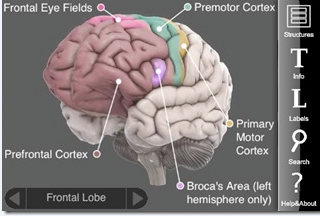
Whether you're a novice or an advanced learner studying the brain, I think you'll find the 3D Brain a worthy free app to download to your iPhone or iPod Touch.

(1) Select the "Structures" icon to view different regions of the brain

(2) Select the "L" Labels option to view the labelled version of the brain region


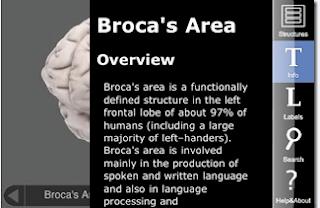
(3) Selecting the "T" Info provides an overview, case study, associated functions, cognitive disorders, damage, substructures. The Research Reviews at the very bottom of the Info page lists research articles that link to PubMed.


Download this app for free from the iTunes apps store.


Swiping your finger to the right/left or up/down on a brain image allows you to rotate the view. Pretty cool stuff!


Your brain will thank you for downloading this handy app.


Monday, August 31, 2009

Medical Games for your iPhone/iPod Touch

I finally caved in last month and got an iPod Touch. (Actually, it was part of a package deal with a MacBook laptop at the campus bookstore.) Wow! I must confess - the little device is power packed with goodies. There are a mind-boggling amount of apps for just about everything.

I stumbled upon two medically related games that can help you have fun while you study. Both are free from the iTunes apps store.

Diagnose the Disease

This game is from the makers of the Epocrates drug resource. You can race the clock to test your knowledge based on the images provided. You can compete with top clinicians and submit your scores. This game is also available to play on Facebook.

Speed Bones Lite

This game tests how well you know your bones. Race the clock and earn points when you answer the questions about skeletal anatomy. Using the Practice Mode lets you learn specific regions. Review Mode replays your mistakes so that you can learn from them.

Since I neither know my diseases nor bones in great detail, let me know if you try out these games and tell me what you think. I believe that having fun will facilitate learning when put to good use. Let's hope these games prove true.

Thursday, August 27, 2009

Test Your Medical Knowledge Using Case Files in AccessMedicine

Looking to understand how to put all your medical knowledge into the bigger scheme of things? Tired of reading and memorizing facts and ready to put them to the test?

The AccessMedicine database is a good source to find Case Files to test your knowledge on real life clinical cases.

(1) Select either the Case Files tab or the Case Files for Students link (see image below)
(2) View the cases by Organ Systems or by Specialty
(3) After reading the details of the case, proceed to the Questions tab; select the View Answers link on the bottom of the page to see if you were correct
(4) The other topics covered with the case are Clinical Correlation, Comprehension Questions to further test your knowledge, clinical Pearls, and References to find out more information

The cases are from the LANGE Case Files series edited by Dr. Eugene C. Toy.


There is also a link to listen to free audio cases.


This Clinical Cases feature in AccessMedicine is ideal for teachers and students alike:


TEACHERS
- browse the cases to get an idea of how to write your own case files for students

STUDENTS - apply and assess your knowledge of material you've covered; use these cases as a group discussion project to help you understand concepts.


View this brief non-narrated tutorial
to see the Case Files feature in AccessMedicine.

Monday, March 23, 2009

YouTube Education Channels

With YouTube, who needs TV anymore?


It seems like anything and everything can be found on YouTube. Missed the Top 10 list on David Letterman last night? No problem, it'll probably be up on YouTube in a day or two. Heard about the amazing two-legged dog named Faith, but you missed her appearance on Oprah because you were busy working? Run a quick search in YouTube on faith two-legged dog oprah and, voila, your wish is their command.

Of course, if you want to see a video of your neighbor playing a nose flute on his porch, I'm sure you could find that on YouTube too.


To satisfy more than just your fluffy entertainment bug, YouTube thankfully has additional "Channels" that include educational videos amongst the many channel topics:

(1) Click on the Channels link to the left of the search box on YouTube
(2) Select Education in the left menu
(3) The top set of videos are under the category of Channels from YouTube EDU; click on that link to get to a full listing of broadcasts from educational institutions.
(4) You can run a search within the YouTube EDU search box (ie, type in medical school) and in the list of results, you can watch a video of Dr. Calvin Chou of UCSF lecturing on the physical exam and bedside manners.


You can also search the regular YouTube search box with words such as UCTV medicine to find videos from the University of California Television broadcasts. Or search on the words education medicine to browse videos pertinent to medical education.

The next time your boss walks into your office while you're watching YouTube, you can show her that it relates to work and is part of your research.

Watch, learn, and enjoy!

Saturday, February 28, 2009

Learn Anatomy with WinkingSkull.com

Looking for a good learning tool to help you learn and test yourself on human anatomy? The WinkingSkull.com offers just that!


This free resource has detailed color images from the Atlas of Anatomy. When you create a free account, you get the full capability to test yourself on what you've learned.

(1) Go to the "My Account" link at the top right to create a free account

(2) Select the region of the body that you're interested in viewing via the left menu

(3) Select the labels to be "ON"

(4) You can also view the labels in Latin by selecting the "US English" box at the top right and switch to "Latin"

(5) You can zoom in and out, as well as hold down the mouse and move around the picture

(6) When you are signed into your account, you can test your knowledge of the anatomy you've reviewed

Be sure to check out their Quick Tips link in the top menu bar.


Watch this short non-narrated video to view these features [click on the "full size" link].