Showing posts with label presentations. Show all posts

Wednesday, July 6, 2011

"What Angry Birds Can Tell Us About Educating the Next Generation of Physicians"

In September 2011, Catherine Reinis Lucey, MD, will be joining the UCSF campus as our new Vice Dean of Education in the School of Medicine. Dr. Dave Irby is her predecessor in this position. Dr. Lucey brings with her expertise from the work she has done as the interim dean and vice dean for education at the Ohio State University (OSU) College of Medicine and associate vice president for health sciences education for the OSU Office of Health Sciences.


Click on image to view video

I recently happened upon a presentation that Dr. Lucey gave as part of AcademiX, an education series sponsored by Apple highlighting mobile technologies in higher education.

She bases her ideas of using mobile technologies in medical education on the example of the popularity of the mobile app Angry Birds. She discusses how to engage medical students through interactive learning on a mobile device.


Below is my summary of her key presentation points:

* In the age of "technology assisted learning", we learn best when at point of need (ie, when treating a patient)

* Utopia of medical education: Create the expert physician

* Deliberate Practice - concept for developing expertise (by K. Anders Ericsson), basis for "Outliers" (book by Malcolm Gladwell)

* Developing expert performance requires:
(1) increasing complex challenges
(2) immediate feedback and coaching
(3) time to practice, fail, practice, improve

* The science and power of motivation:
Having a cycle of challenge -- Allowing time for correction -- Time for reinforcement -- A time rechallenge

* Example: Computer games
(1) engaged user challenged to master skills in each level
(2) the device becomes the coach by allowing/denying passage/progress to next level based on skills learned

Examples of ideas generated at Ohio State University School of Medicine -

(1) "Angry" Mammograms app
-radiology training for reading mammograms
-provides levels of complexity & nuances
- tiered in difficulty
- develops pattern recognition

(2) "Angry" Heart sounds
- auditory learning
- reinforce through repetition, like listening to pop music over and over to learn the melody and lyrics

Goal - to embed mobile devices into medical curriculum to increase efficiency in learning in the process of creating the expert physician.

* Presentation video at http://tinyurl.com/3qvjznt
* Presentation slides at http://tinyurl.com/3ptfuon
* Dr. Lucey's bio at http://tinyurl.com/3oktlaa

Check out previous postings from my blog that relate to gaming apps for medical education topics - http://mededlit.blogspot.com/search/label/games

Wednesday, June 15, 2011

The Future of Medicine TED Talk

If you haven't gotten a taste of a TED Talk lately, here's one to inspire us towards the vision of how doctors are and will be treating patients with the exponential growth in technologies now available.

Watch oncologist, Dr. Daniel Kraft, a physician scientist, give his April 2011 TED Talk, on "Medicine's future? There's an app for that"


Wednesday, October 28, 2009

Free Mind Mapping Tools

Oh boy - I've found some scrumptious free mindmapping tools that I need to share with you!

Mind mapping is a way to visualize concepts by drawing out associations between your ideas. It can be extremely useful as a brainstorming tool and even for teaching. It combines the textual and visual cognitive senses we use to help us understand concepts.

Two absolutely free and absolutely easy to use mind mapping tools are:

(1) bubbl.us - you don't need to set up an account. Simply click on the "Start Brainstorming"button.

The controls are intuitive. For example, hovering over the first box allows you to type in text. You can hover over parts of that box to show crosshairs that allow you to reposition the box wherever you want. The other hovering options allow you to add boxes stemming from the original. You can change the color of the boxes.

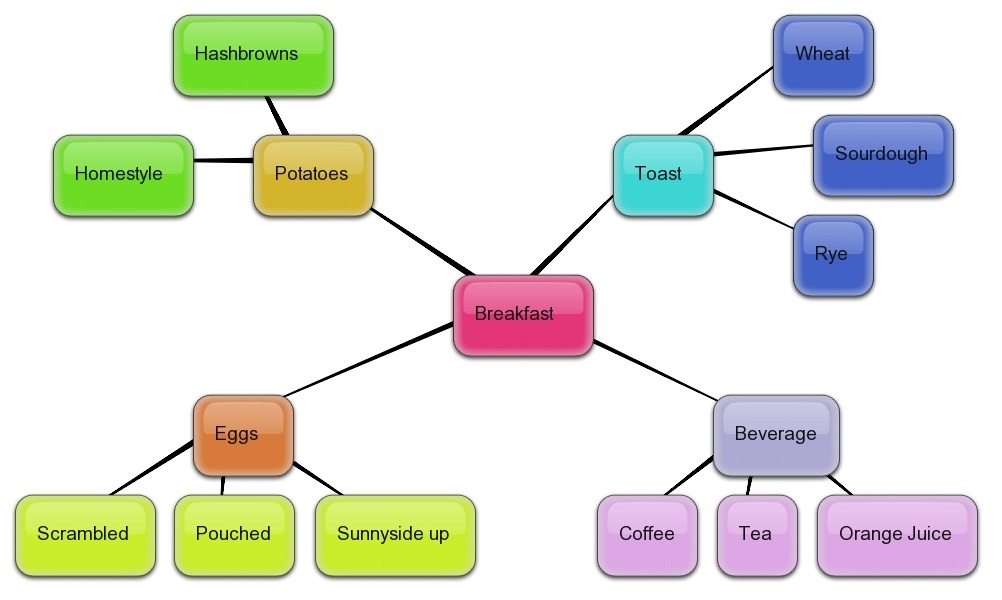
When you're done mapping, click on the Menu button at the bottom right of the screen. You can export the map you've created as an image, XML, or HTML file. Below is an example of a mind map I created using bubbl.us:


(2) SimpleMind Xpress - this is a free app for your iPhone or iPod Touch. There is a paid version, but I find the free one does a good job. You can upload your final mind map to your iTunes and then download it to your computer as a document.


This presentation below gives some helpful pointers on how to maximize the effectiveness of your mind mapping exercises.


These tools produce such graphically appealing mind maps that you'll feel compelled to map out just about anything. Knock yourself out!


Tuesday, September 22, 2009

Cultivating Creativity in the Classroom

As a student, you know that rote memorization is no way to learn something well if you want to remember it in the long run.

As a teacher, you know that overloading your students with facts during an hour-long lecture without giving them a chance to engage in discussion is no way for you to get your message across to them effectively.

As more and more medical students opt to not attend lecture and instead watch or listen to recorded lectures at their own pace, what is an instructor to do?

There are many debates going on in the world of higher education trying to creatively answer this question. There has been no magic solution to this recent conundrum. Educators are forced to be more creative.

Therein lies the answer - instructors must cultivate creativity in the classroom. The following presentation, Cultivating Creativity in the Classroom, was put together by Jamie Tubbs, a 5th grade teacher in Ohio.

As educators, I hope that we can find inspiration in how to engage learners at any age. Tubbs' ideas are well presented in this quick slideset. May it give you pause and food for thought as you think up ways to re-engage with your students and the content you are teaching.

Friday, May 29, 2009

Personal Learning Environments: the new era of education

Technology has taken learning to an entirely new level in the 21st century. No longer do students learn by just receiving information from instructors in the classroom or lecture environment. Tools such as blogs, wikis, podcasts, YouTube, MySpace, Facebook, Twitter, text messaging, and smart mobile devices fold in multiple layers of alternative delivery of knowledge and communication.


Students no longer just write papers or take tests to show what they've learned. They create websites, blogs, and videos to capture and showcase their learning. I, for one, am very excited to see this wave of creativity surge in education. These new tools empower learners to develop a hybrid approach to exploring and defining their own learning styles.


What I've just described is the personal learning environment (PLE).

Watch & listen to this presentation by Graham Attwell, an "educational technologist, researcher and blogger based in Pontypridd in Wales and Bremen in Germany. "

Read more about PLEs:

- Attwell's compendium paper to the presentation above

- 7 things you should know about PLEs

Watch this great video that clearly paints the picture of our future, if not already present, medical students.


Wednesday, April 29, 2009

Understanding the Millennials

My parents are Boomers, I'm a Gen-X'er, and my students are Millennials. If you teach Millennials, you will definitely agree that they carry a vibe very different from the previous two generations.

This presentation, "The Generations Game" is very worth going through. It will take you less than ten minutes to read it.
  • If you're a teacher - you can get a solid grasp of where your Millennials are coming from.
  • If you ARE a millennial - take a look and see what data has been acquired and interpreted about who you are as a generational group.

The presentation is co-authored by two educators in the United Kingdom - Steve Mellor, the Head of Youth and Kids Research at Harris Interactive Europe, and Cathy O'Donnell.

(click on the projection screen icon above to view the presentation in full screen mode)

Learning about how our students think will open the doors to how we can keep our students engaged as we develop our plans and innovations to keep medical education on the cutting edge. Knowing our audience is in the best interest of educators and students alike.

Monday, March 23, 2009

YouTube Education Channels

With YouTube, who needs TV anymore?


It seems like anything and everything can be found on YouTube. Missed the Top 10 list on David Letterman last night? No problem, it'll probably be up on YouTube in a day or two. Heard about the amazing two-legged dog named Faith, but you missed her appearance on Oprah because you were busy working? Run a quick search in YouTube on faith two-legged dog oprah and, voila, your wish is their command.

Of course, if you want to see a video of your neighbor playing a nose flute on his porch, I'm sure you could find that on YouTube too.


To satisfy more than just your fluffy entertainment bug, YouTube thankfully has additional "Channels" that include educational videos amongst the many channel topics:

(1) Click on the Channels link to the left of the search box on YouTube
(2) Select Education in the left menu
(3) The top set of videos are under the category of Channels from YouTube EDU; click on that link to get to a full listing of broadcasts from educational institutions.
(4) You can run a search within the YouTube EDU search box (ie, type in medical school) and in the list of results, you can watch a video of Dr. Calvin Chou of UCSF lecturing on the physical exam and bedside manners.


You can also search the regular YouTube search box with words such as UCTV medicine to find videos from the University of California Television broadcasts. Or search on the words education medicine to browse videos pertinent to medical education.

The next time your boss walks into your office while you're watching YouTube, you can show her that it relates to work and is part of your research.

Watch, learn, and enjoy!

Friday, November 21, 2008

Wikipedia: Love It or Leave It?

Wikipedia - honestly, who can say they have NEVER searched it before? The convenience and relative ease of finding information from Wikipedia is too tempting to bypass. Plus, Google floats Wikipedia pages pretty high up on a list of results.

For example, if you search myasthenia gravis in Google, Wikipedia is the FIRST result to appear. This entry beats out results from the National Institute of Neurological Disorders and Stroke and from the Mayo Clinic! What is at the top of a Google results list is the most linked to page on the search topic, not necessarily the most accurate or relevant page.

Over the past two years, I've noticed that some medical students cite Wikipedia as their source in writing up a short assignment. As an education librarian, this makes me twinge just the slightest bit and sigh. I teach students that Wikipedia can be a good place to start to get an overview of information, but it's NOT a resource you should cite. This is especially true if you are researching a health topic. But again, convenience wins out and some students cite Wikipedia anyway.

Wikipedia is a bit like the game of telephone that we played as children. The first person whispers the sentence to the person next to them, and as we all know, by the time the last person has received the information, it has morphed itself. That's the thing with Wikipedia and health information - most of it is quite good, but to cite it as your main resource could be risky. If by chance the information you gathered is inaccurate, you run a risk of doing harm with this information if you choose to make a medical decision for a patient based on what you find in Wikipedia.

So how then to make Wikipedia useful for finding more reliable information?

Thankfully, a well built Wikipedia entry has bread crumbs to lead you down the path to better sources of information.

(1) Look for the References link in the Contents box to see what resources were cited

(2) If a piece of information sounds interesting, look for a reference citation number (and click on it) at the end of that sentence.

(3) If it's a well-researched topic, you will see research articles listed. Clicking on the PMID or PMC link at the end of an article title will get you to the abstract in PubMed.

(4) Under the External links at the bottom, there may also be useful associations and other websites

Want to know how often a page has been edited?

Click on the history tab at the top of the page. You can see how busy people have been editing this information. Frequent editing should be a red flag of how much you can trust the information to be accurate.

Reuter's published an interesting article this month entitled Wikipedia often omits important drug information.

What's my final say on Wikipedia?

- If you find yourself on a Wikipedia result, it can be a lauching pad for finding better resources to link to and to cite those reliable resources instead of Wikipedia.

- It's a good place to get a gist of a topic.

I'm glad to see in the presentation below that a doctoral student in Communications at the University of Buffalo (SUNY) expressed his views on Wikipedia and how it can be used in education:
I Heart Wikipedia
View SlideShare presentation or Upload your own. (tags: education students)

Friday, October 31, 2008

Re-Thinking Presentation Design (ppt)

Time to update your presentation style? Everyone can dazzle with a fresh coat of paint in a new color.

This powerpoint presentation by Oliver Adria, an electrical engineering student in Cologne, Germany, is a testament to how revamping your presentation style can make your topic more memorable to your audience.

For other presentation tips, see my blog post in June.

Monday, August 25, 2008

Podcasting Lectures: Friend or Foe

Podcasting of lectures has been the most common use of broadcasting and archiving educational content using media files. "Enhanced podcasts" are growing in popularity because listeners can also view the lecture content, such as PowerPoint slides, while listening to the lecture.

As more students listen to podcasts of their lectures, will this make them less likely to attend lectures? Is this an issue that professors should worry about as they decide to podcast their lectures? Or are we starting to sound like our predecessors who worried if radio would replace the book, if TV would replace the radio, or if CDs would replace LPs?

Below is a presentation by educators at the University of Bath in the U.K. Slide16 through the end of the presentation cover reasons why enhanced podcasts can enhance learning.


There is no denying that some students will be even less motivated to attend lectures because they can view them online. But the benefits outweigh the risks.

As of Aug 2008, there are 52 articles, dating back to December 2005, that mention podcasts.

Here's the most recent article specifically targeting podcasts for undergraduate medical students:

Pilarski, PP, Alan Johnstone, D, Pettepher, CC, et al. (2008). From music to macromolecules: using rich media/podcast lecture recordings to enhance the preclinical educational experience. Medical teacher, 30(6), 630-2.

I also blogged early this year about an article that looked at how podcasting lectures influenced student in-person attendance. Time will tell us what becomes of all this podcasting. But there's no doubt that podcasting will evolve to find its place in education.

Thursday, July 31, 2008

How to Brainstorm Effectively

Get together a group of people. How do you gather and distill their expertise to create and innovate for positive change and development? BRAINSTORM! I know all of us has participated in at least five or more brainstorming sessions in your professional life. The energy of a brainstorm invokes the "Oh! I have an idea!" notion that we all had as a kid. But as adults, how can we make brainstorming sessions be truly worthwhile? Check out this presentation for some brainstorming tips.

Monday, June 30, 2008

11 Advantages of Using a Blog for Teaching

Here is an interesting presentation, titled 11 Advantages of Using a Blog for Teaching by Frank Calberg, a strategic inspirator from Zurich, Switzerland.


This blog that I have created has been a way for me to teach to the many people who I will not be able to come face to face with because of distance and time. For example, I had an average of 350 views of this blog just in the month of June. On average, I meet with about 20 people per month in person or via email to help them with their literature searches. So the fact that I can teach that many more people through this blog is a testament to the power of using a blog to disseminate knowledge farther and wider.

If you have never created a blog and want to play around with how to create and use them, you can start with Blogger, which is free. There are other alternatives such as Wordpress or Typepad. If your institution already has purchased blogging software, contact your administrator to find out about using it.

Using a blog to teach can be a fun, interactive, and dynamic tool for you to consider using in your role as a teacher.


Monday, June 2, 2008

IRAM Curriculum Integration

Through a joint research project between the UCSF School of Medicine and the UCSF Library, there is a term that we've coined as "IRAM".

IRAM = Information Retrieval And Management

IRAM covers skills such as evaluating information resources, properly citing information, literature searching skills, and managing citations for research, presentations, and publications.

I recently presented at the annual Medical Library Association Conference in Chicago the results of the work that I have been doing as the UCSF Library's liaison to the School of Medicine. Please see the presentation and handout posted online.

My hope is that the work done here at UCSF gives you an overview of what is involved in integrating an information skills set into the medical curriculum. Feel free to leave me your comments to share any of your thoughts.

Thursday, February 21, 2008

Slideshare.net - Search for PPT presentations

In Google Quick Tip #2, I showed how you can run a Google search to find just PowerPoint (ppt) presentations. Imagine how excited I was to stumble upon Slideshare.net

Why's it so great?

1) It's a collection of user-posted ppt presentations
2) It's easy to search - just use the search box at the very top right
3) You can upload your own presentations to the site

I ran a search on the words teaching learning and got these results.
I searched on the words obesity diabetes and found a great CDC ppt with vital statistics on obesity.
To view a presentation in full screen mode, click on the icon under the slideshow.